Thursday, 1 May 2014

Ubuntu for Android gets the axe

The recent news of Canonical pulling the plug on Ubuntu for Android will probably only upset a few die-hard users.

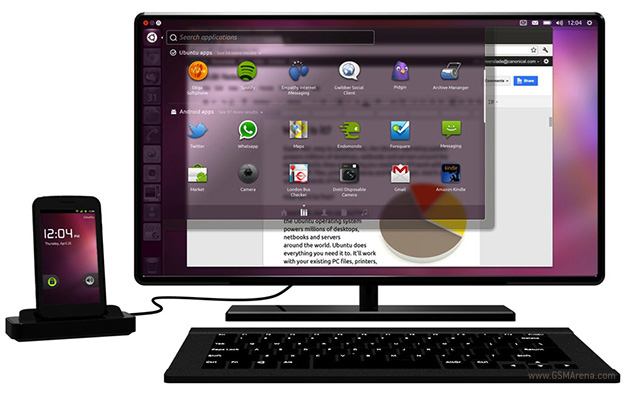
Despite the cool concept of being able to use your smartphone as a fully functioning desktop OS once you put it in a docking station, Canonical has decided to halt development of the project.
The plans to shut Ubuntu for Android down were found in a previously public bug report (it’s now hidden) which stated, “Ubuntu for Android is no longer in development.”
The demise of Ubuntu for Android doesn’t really come off as that big of a surprise: Canonical is currently working on its own mobile OS, and expending resources on a project that was more of a novel experience than one that was greatly used is definitely the smarter business move.
Still it does seem like a shame that such a novel and exciting prospect will be going the way of the Dodo. Being able to carry your phone with you and having a low cost, fully functioning Desktop computer with you wherever you went: being able to have a dock with a keyboard, Monitor, and an external hard drive set up was a really cool idea. Hopefully the Ubuntu for Android project will live on in the developer community.
Anybody sad to hear the news?
Source | Via

Sony Xperia Z2 vs. Google Nexus 5

nexus5 xperiaz2 comparison 5
With the rise of lower priced flagship devices in the likes of the Moto X and the Nexus 5, we’re often faced with the following dilemma: should we be content with these devices or throw in a little bit extra money for one of the pricier flagship devices? We take a little closer look between this choice in our comparison of the Sony Xperia Z2 and the LG/Google Nexus 5.
© AndroidPIT

Design

No question, the glass housing and aluminum frame of the Xperia Z2 is of much higher quality than that of the Nexus 5 and its polycarbonate shell. However, both materials have their benefits and it really comes down to a matter of personal choice when comparing the design and material choices of a smartphone.

nexus5 xperiaz2 comparison 9
What's your personal taste when it comes to design choices? / © AndroidPIT
The rubberized plastic of the Nexus 5 has a pleasant feel to it and the device itself is much more compact, so it feels more natural when held. The Xperia Z2 is not only a little bit wider, but also significantly longer than the Nexus 5, which can cause some discomfort if you’re got smaller hands.
nexus5 xperiaz2 comparison 3
The Xperia Z2 is slightly wider and much longer than the Nexus 5. / © AndroidPIT
Overall, however, the Xperia Z2 is more polished in its design and has the feel of a “higher quality” build. The Nexus 5, however, has an ergonomic factor that is well suited for smaller hands or one handed operation.

Display

Both devices have high quality displays. The Xperia Z2 has a slightly larger display, coming in at 5.2-inches compared to the 5-inches of the Nexus 5. However, the difference is not very noticeable unless compared side to side. In terms of brightness and color fidelity, the Z2 comes ahead of the Nexus 5 which displays whites as “milky” or washed out and is not quite as bright compared to the Sony phone.  Image quality and the viewing angle on both devices are up to the standard of flagship devices. As an extra, however, the Xperia Z2 has built-in image enhancement software in the form of X-Reality which provides a significant boost to the display of images and videos.

Hardware and Performance

When the Nexus 5 came out to the market, it was equipped with the best available hardware at the time and that hasn't changed much after being on the market for six months and it is still relatively competitive to the newer devices coing out. The Xperia Z2 does come ahead, however, with a next generation processor and more memory. The graphics chip and the clock rate on the processor are both the same on the Nexus 5 and Xperia Z2. The differences between the two isn't that great and during day to day use, you'll notice that both devices are lightning fast.

Camera

This is where the Xperia Z2 really takes the cake: the camera on the Xperia Z2 has a maximum resolution of 20.7 megapixels when shooting in a 4:3 format. Even when shooting at the wider angle of 16:9, there are still 15.5 megapixels to play around with. In comparison, the Nexus 5 has a only 8 megapixels.
nexus5 xperiaz2 comparison 1
The difference between the two displays is barely visible when compared in this picture, hwoever, in practice the Xperia Z2 has a much better display. / © AndroidPIT
In addition to the much more robust camera hardware, the Xperia Z2 also boasts better camera software. As noted in the past and “fixed” in some of the recent Android KitKat upgrades, the Nexus 5 has had some issues with its camera performance.

Software and Tools

If you’re not a fan of the “extras” added in by manufacturers with their user interfaces, the Nexus 5 is definitely for you. The pure Android experience comes with guaranteed and regular updates to the operating system. Sony seems to have pulled back in terms of bloatware lately, not trying to over encumber their user interface with useless apps and features. The media apps from Sony are great, their Walkman app for example, and the Xperia Z2 also comes with a useful energy saving mode called Stamina. Other pluses incorporated into the Xperia Z2 are the glove mode, the previously mentioned X-Reality display booster. As well, a nifty feature is also incorporated into the Z2 with being able to double tap on the screen to wake the device.
nexus5 xperiaz2 comparison 4
In terms of software and extras, the Xperia Z2 provides some nice benefits. The Nexus 5 still provides a pure Android experience. / © AndroidPIT
For those who don’t like encumbering their device in a huge protective case are in luck with the Z2 as it is water and dust resistant right out of the box. AS well, it has the ability to have its internal storage increased via microSD. In terms of accessories, the Z2 also comes with some good quality noise cancelling earphones included with it. The Nexus 5, however, only comes with a USB cable and a power connector.

Battery

In the past, the battery side of things has been a sore subject when it comes to Sony devices while LG (the manufacturer behind the Nexus 5) has always been pretty good. The Xperia Z2 has a much larger battery, coming in at 3200 mAh compared to the 2300 mAH of the Nexus 5. However, in internal tests, the battery in the Nexus 5 is more than enough to get a power user through the day.

Technical Specifications

  Sony Xperia Z2 Google Nexus 5
System Android 4.4 Android 4.4
Display 5.2 inches, IPS, 1920 x 1080 pixels, 424 ppi 5 inch, IPS, 1920 x 1080 pixels, 441 ppi
Processor Snapdragon 801, quad-core, 2.3 GHz Snapdragon 800, quad-core, 2.3 GHz
RAM 3 GB 2 GB
Battery 3200 mAh 2300 mAh
Internal memory 16 GB, microSD up to 128 GB 16/32 GB
Camera 20.7 MP (rear), 2.2 MP (front) 8 MP (rear), 1.3MP (front)
Dimensions 146.8 x 73.3 x 8.2 mm 137.9 x 69.2 x 8.6 mm
Weight 158 grams 130 grams
Connectivity UMTS HSPA +, LTE, Bluetooth 4.0, NFC, Wi-Fi, USB 2.0 UMTS HSPA +, LTE, Bluetooth 4.0, NFC, Wi-Fi, USB 2.0

Conclusion

Of course, the Nexus 5 is significantly cheaper and older than the Xperia Z2, but one of the biggest things we’ve noted while comparing the devices is that if you’re just a regular smartphone user, you probably won’t really notice much of the difference.  If you’re looking for a phone at a great price that can at least compete against some of the pricier flagship devices, the Nexus 5 shouldn’t be discounted. For those who are all about performance or image quality when taking pictures on the go, the extra cost of the Xperia Z2 is definitely worth it: it has more robust technical specifications, microSD slot, and better overall protection. Nevertheless, it’s all about what you’re looking to get out of a phone. 
(originally by Johannes Wallat)

Samsung offends Galaxy S5 owners with S5 Prime release

samsung galaxy s5 prime case leaked on amazon
While there's still no official confirmation that there even is a Galaxy S5 Prime, several outlets are claiming it has been confirmed that Samsung will release a premium version of the Galaxy S5 flagship with a 2K display in June sometime. Fact or fiction, owners of the Galaxy S5 are not very happy about possibly having their flagship trumped just a few short months after the last one.
If the Galaxy S5 Prime rumor turns out to be true, Samsung will have upset a lot of S5 owners. / © Amazon
Sam Mobile picked up source code for the Galaxy KQ a week ago, and ever since then the story that it is indeed a Prime version of the Galaxy S5 has been gaining traction. The Galaxy S5 was known internally as Project K, so the naming convention is entirely possible. Sam Mobile also revealed the expected specs for the new device and a QHD Samsung device has recently appeared on AnTuTu's benchmark database, as well as in some shipping logs out of India. Several Korean news outlets are now reporting a June release date.

AndroidPIT S5 Finger Scanner
Sasung were working on an iris scanner until it was replaced with the finger scanner. / © AndroidPIT
The Galaxy S5 Prime will reportedly house a 5.2-inch QHD display with 2,560 x 1,440 pixel resolution along with a whole swathe of new internals to power that display. The European version is rumored to include a quad-core Snapdragon 805 at 2.5 GHz backed up by Adreno 420 GPU and 3 GB of RAM. The Korean version will ship with an octa-core Exynos 5430 chipset, but none of these specs are confirmed. There's also whispers of an integrated LTE modem for both markets
Display 5.2-inch, 2560x1440 pixels
Processor Quad-core Qualcomm Snapdragon 805, 2.5GHz, with Adreno 420 GPU (European and possible North American markets) / Octa-core Exynos 5430 (four 2.1 GHz Cortex-A15 and four 1.5 GHz Cortex-A7 cores) 600MHz ARM Mali GPU (South Korean market)
RAM 3 GB
Camera 16 MP rear/ 2MP front-facing
Storage 32 GB
Operating System Android 4.4.2 KitKat
We've been talking about the Galaxy F super-premium line for a while, and I shared my reasons why you should expect the S5 Prime a while ago. While we still have no word on whether the S5 Prime will be clad in a metal chassis, or whether other S5 shelved features like the iris scanner might make their debut in the new device, but we do know that early prototypes of the Galaxy S5 did have a 2K display until it was pulled after the third iteration.
samsung galaxy F
The rumors persist that the premium S5 will have a full metal jacket./ © Samsung
If this story pans out to be true, it's an interesting strategy from Samsung, to release a 'more' premium version of a flagship without letting the purchasers of the original flagship know they weren't getting the 'real' flagship. Of course, letting the cat out of the bag back then would have made an impact in S5 sales, and Samsung certainly doesn't want that. Plus, competing with LG's upcoming G3 has got to be a contributing factor in any decision to release a 2K device as well. I have to admit though, it does seem a bit underhanded if all this plays out the way the rumors are proposing. If I had bought a Galaxy S5 I'd be feeling pretty duped right about now too.
Have you picked up a Galaxy S5 already? What do you think about Samsung's strategy?
Via: G4Games Source: Asia Today (Google Translate link), Sam Mobile

How to get a Google Now shortcut on Samsung Galaxy devices

google now teaser
Because Galaxy devices don't have the dedicated Google Now home screen that stock Android devices enjoy, you're stuck with a rather clumsy way of accessing the super useful feature. But using Google Now in a more efficient manner is actually a piece of cake. Assuming you have no need for S Voice's shortcut from the Home button (which you probably didn't even know existed), you can switch that action out with a much more useful one: launch Google Now.
Using Google Now better on your Galaxy device is super easy. / © AndroidPIT
On many devices you can access Google Now with a swipe up from the bottom of the screen, but in my experience I find myself accidentally launching Google Now with that gesture more often than I'd like to. If you've got a Samsung device however, you don't have to worry about this clumsiness, as that hardware button that some love and others hate is actually a great tool for setting your own launch actions.

AndroidPIT S Voice Home2 Shortcut
First ditch S Voice's default launch action (left) and install Home2 Shortcut (right) / © AndroidPIT
1. First up, you need to disable the default action for a double press on the Home button: launch S Voice. In the app, hit the Menu key and then Settings, then uncheck ''Open via the home key''. This will free up the double press action which you can then reassign with an app called Home2 Shortcut. Download that bad boy below (that's it in the screenshot above).
AndroidPIT Home2 Shortcut 1
Follow the steps to create a shortcut action to Google Now. / © AndroidPIT
2. Launch the app and scroll down to Step 1. Here you need to choose the app to be launched by the double press of the Home button. Tap ''Choose Application'' and then ''Installed Applications'' and select Google from the list. Hit OK to confirm. (Of course, you need to have aGoogle Now turned on and a Google account signed in for it to work).
AndroidPIT Home2 Shortcut 2
Set your speed interval and default Home application from the list. / © AndroidPIT
3. Now, you need to select the speed of the double tap, your default Home application and then when you click Close at the bottom of Home2 Shortcut, you'll be prompted to select which Home application you want to use.
AndroidPIT Home2 Shortcut 3
Select Home2 Shortcut as your default Home application and set it to ''Always''. / © AndroidPIT
4. Because Home2 Shortcut is in control of the double press to launch Google Now action, you want to select it and choose it as the new default and set it to ''Always''. You can always clear defaults later in Task Manager.
AndroidPIT Home2 Shortcut 4
You can always clear your defaults later, but now you have Google Now at your fingertips! / © AndroidPIT
There's other ways to access Google Now from your Galaxy as well. You can long press the Menu button on a home screen to launch Google Search, which will also have your Google Now cards underneath, or, if you have the Google Search bar on your home screen, you can simply tap it to get the same result.
Plus there's the Google Now Launcher and Google Now's Hotword Detection, but these may be a bit impractical for for those that don't want to replace their launcher entirely or who feel a bit weird saying ''Ok Google'' all the time. You can also add a Google Now widget to a home screen, but if you prefer an out-of-sight, slick launch action, then Home2 Shortcut is the way to go.
Are you using Google Now? How do you access the feature?
Source: Google Play Store

Moto X camera launching gestures now on all Android phones

camera moto x dicas
One of the unique features of the Moto X phone was its camera launching gesture that allowed the user of the phone to twist their wrist twice in order to quickly open up the camera application. This is useful for obvious reasons but now the feature has come to other Android phones in the form of the quick camera app.
Moto X Camera gestures now available to all Android phones / © AndroidPIT
An XDA users decided that there would be demand for the service on other Android phones so an alpha version of an app called Quick Camera is now on the Google Play store and it mimics the Moto X’s intuitive gesture.
The app is simple. All you have to do is start the service. It runs in the background and it will open up the camera app if you twist your phone in quick succession. The accelerometer in the Android phone is used to register the gesture and since it is standard in nearly every Android phone this means it should work with almost any Android device on the market nowadays.
The app is in its alpha stage which is before the beta stage so it will still be buggy and will probably take up more battery life than the finished version will. If you’re interested in downloading it you can join the testing community here.
If you have a comment please leave it below and we will get back to you.
Source: Talk Android

Android 4.4.3 update: which devices will get it?

android 4 4 kitkat logo 4 4 3The update to Android 4.4.3 has been a tricky little beast: first leaked by Sprint for the Nexus 5 the update never really saw the light of day. Nevertheless, the rumors continue to circulate about when it will appear, who will get it and what it includes. We've written previously about the various bug fixes that Android 4.4.3 will address, but today we wanted to share the latest on which manufacturers have plans for the update.
Android 4.4.3 hasn't arrived yet, but we have some pretty good ideas about who will get it. / © AndroidPIT
All sources agree on a May release for Nexus devices, June for Google Play editions and in the following months for everyone else, according to both manufacturer and carrier information. However, nothing is officially confirmed in this summary, it is all based on analysis of leaks and rumors. Also, when we have too many doubts about certain devices, we'd prefer not to announce anything, but rest assured, there are more out there in the pipelines.

AndroidPIT Nexus Family
Nexus devices are, as always, first in line for the latest Android update. / © AndroidPIT

Nexus and Google Play edition devices

It's a safe bet that the Nexus 5 and Nexus 7 will the first devices to get the Android 4.4.3 update in the coming weeks. According to "reliable" sources around the net, the update will also cover the Nexus 4 and Nexus 10 but also the various Google Play editions in June (including HTC One, Galaxy S4 and Moto G).
  • Nexus 4
  • Nexus 5
  • Nexus 7
  • Nexus 10
  • All Google Play edition devices
AndroidPIT Android443 Qcamera
The mm-qcamera-daemon bug needs to be flushed from the Nexus 5. / © AndroidPIT/Android Police

Samsung

The Galaxy S5 will receive Android 4.4.3, for sure, but don't hold your breath for it to be speedy. It is also almost certain that the Galaxy S4 will receive the update, probably a little later, probably in the fall. It stands to reason that an update is in the pipes for the Galaxy Note 3 as well but the Galaxy Note 2 and Galaxy S3 will not qualify for the update.
Regarding tablets, it is difficult to decide on the Galaxy Tab 3 series, because Samsung are not as responsive to updates for mid-range devices as flagships. It is possible that the Tab 3 will not get the update and instead the Android 4.4.3 debut will be on the upcoming Galaxy Tab 4. The Galaxy Tab Pro 12.2, Tab Pro 10.1 and Tab Pro 8.4 should, however, benefit from the upgrade, considering they are already on Android 4.4.2 KitKat and have a higher price tag.
  • Galaxy S4
  • Galaxy Note 3
  • Galaxy S5
  • Galaxy Tab Pro 8.4
  • Galaxy Tab Pro 10.1
  • Galaxy Tab Pro 12.2
HTCAndroid443Schedule
When it comes to HTC update plans, @LlabTooFeR is hard to beat for information. / © LlabTooFeR

HTC

According to HTC developer LlabTooFeR, HTC will begin the deployment of the Android 4.4.3 update with the HTC One (M8) in May-June, along with some possible improvements to the Sense 6.0 interface. The HTC One (M7) will have to wait until June-July but it will get the Sense 6.0 treatment at that time too. The One (M8) Google Play edition should receive the update shortly before the M8 running Sense. Unfortunately it seems that the mid-range and entry-level models of the brand will be remaining on Android 4.2.2 and Sense 5.0, with only Butterfly models making it to Android 4.4.2 and Sense 5.5, but no plans for Android 4.4.3 or Sense 6.0. The HTC One (M7) dual-SIM variant has no plans for the update either and there's no word on the One Max or One Mini.
  • HTC One M8 Google Play edition
  • HTC One M8
  • HTC One M7
AndroidPIT Sony KitKat
Sony's plans haven't been braodcast yet for Android 4.4.3, but it's coming. / © AndroidPIT

Sony

Recently, a Google Play edition Xperia Z Ultra was spotted running Android 4.4.3. The info comes from a Bluetooth SIG listing sheet, which pretty clearly shows a KTU72 software version (the supposed Sprint update for the Nexus 5 was KTU84), but this doesn't mean anything for the widespread release. Nevertheless, it's a Google Play edition device, so we'd expect it to arrive at the same time as the other GPe devices listed above.
Sony is generally known for announcing updates directly on the product support pages on its official website. This is commendable and helps to silence the rumors, but the information available at present for most devices simply tells us that the current version is "Android 4.4 KitKat" with no mention of future updates adding that extra decimal point. It is very likely that the Xperia Z2 and Xperia Z2 Tablet will both receive Android 4.4.3 at some point though.
  • Xperia Z Ultra Google Play edition
  • Xperia Z2 Google Play edition
  • Xperia Z2
  • Xperia Z2 Tablet
lgg2 4 4
Will the LG G2 get more KitKat or jump straight to Android 4.5 or 5.0? / © AndroidPIT

LG

LG is a little behind in updates, and the LG G2 could skip the minor bug fixes (mostly directed at the Nexus 5) included in Android 4.4.3 and go directly to the next iteration, either Android 4.5 or 5.0. Very little information has leaked on LG updates and even if it seems highly likely that both the LG G2 and G Pad 8.3 will be updated, nothing is confirmed. The LG G3, which is expected to arrive in June, may very well be released with Android 4.4.2. As for the G2 Mini, it remains very uncertain, as mini devices never seem to get the same amount of love as their larger screened and more expensive brothers.
  • LG G2
  • LG G Pad 8.3
kitkat moto g motorola
Let's see if the Moto G and Moto X beat any Nexus devices to the Android 4.3 party. / © AndroidPIT

Motorola

Considering the Moto X scored the Android 4.4. KitKat update before the Nexus 4, it seems safe to assume that Motorola will be on the front foot when it comes to the Android 4.4.3 update, but there's even less than no rumors swirling for the Moto X and Moto G. With the sale of Motorola to Lenovo, the close ties to Google have been severed, but Google always said that Motorola wouldn't be treated any different when it came to updates. The Moto skin, being very close to stock Android, is a big reason why they managed to get the updates out so quick. Let's hope the same is true for both the Moto X and Moto G on Android 4.4.3.
  • Moto X
  • Moto G
  • Moto G Google Play edition
Have you heard any other news about possible timelines for Android 4.4.3 or which devices will be getting the update?
Via: GottaBeMobile Source: LlabTooFeR, Xperia Blog, Ameblo

LG G3 launch event to take place on May 27

LG has started sending out invites for their event on May 27 and 28. Although not explicitly mentioned as such, the event is likely going to be the launch of the highly anticipated LG G3 smartphone.

The event will take place over two days, with May 27 seeing the launch in San Francisco, New York, and London and on May 28 in Seoul, Singapore, and Istanbul.
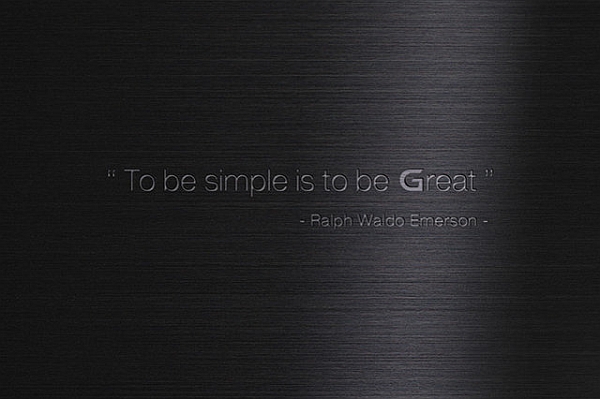
The launch invite simply has a quote from American writer Ralph Waldo Emerson, saying "To be simple is to be Great." The text is placed on a brushed metal background but even if the phone does sport this finish it doesn't necessarily mean it will be made out of metal.
We'll likely be seeing and hearing more of this phone in the coming month before the launch.
Source