Saturday, 3 May 2014

Google Now can help you find your parked car

ok google search
It may be a small update, but it is definitely something that I’ll be using the future. As the owner of a generic car in a generic color, I always seem to be wandering around the parking lot trying to figure out where exactly I parked. Thankfully, this will soon be a thing of the past as Google has rolled out a new feature in Google Now that will help you find your parked car.
Ok Google, where is my car? / © Google, AndroidPIT
As of the latest update, Google will remember the last position in which the vehicle has been stopped and will automatically keep track of that last location. Really nothing else other than that: Google Now will place a pin when you stop your car for an extended period of time so that you can pull up the information when you need to find your way back.
Sure, while this seems like a simple solution, there is still some bugs that need to be ironed out: you may trigger a parking card in Google Now if you’ve received a ride from a friend or if you’ve recently taken public transit, but Google is in the process of working out the kinks. As with most things Google Now related, you can customize when these parking cards are suggested and can turn them off entirely if you don’t want to see them showing up.
Parking location cards will start appearing once you’ve updated your Google Search on Android to the latest version. 
Via: The Verge Source: Google Play

More Samsung Galaxy S5 tips and tricks

galaxy s5 watermark 6
The longer you have a Galaxy S5, the more you realize how full it is of little in’s and out’s that take some time to get used to. Today we’ll share more tips and tricks with you, if you didn’t get your fill from the essential S5 tips and tricks earlier this week, all demonstrated in a hands-on video.
androidpit galaxy s5 tips 3
Find anything on the S5 with S Finder. © AndroidPIT

androidpit s5 tips 2
Aside from the Quick Settings in the notification bar, toolbox provides you with fast access to some of your basic and most used apps, like the calculator and memo pad. © AndroidPIT

samsung galaxy s5 tips teaser
© AndroidPIT
androidpit tips s5 1
Private mode is Samsung's solution for keeping your personal data under wraps. © AndroidPIT
Check out the tips and tricks in our video demonstration:

One-hand operation

For small-handed folk, the one-handed operation mode offered on the Galaxy S5 is a huge help. Especially when on that daily commute where one-handed operation is a must, it will minimize the size of the used screen, so everything can be reached with your thumb. First you need to switch in this feature in the settings, which you can then trigger by swiping your thumb in and out of either side of the screen, depending if you are a right and left-handed users. It includes quick access to some apps on the bottom and side of the minimized window, whose size can also be adjusted by pulling on the outter corner.

Cinema mode

The best possible viewing mode for watching videos, playing games and even doing online shopping is cinema mode, which is easily located in the settings under Display. This mode provides for the best color replication and make your viewing experience a lot more enjoyable.

Private mode

Nowadays, everyone is worried about keeping private information under wraps and Samsung took this into consideration when creating the software for the S5. They integrated a new feature called Private Mode, which allows you to hide documents, videos, pictures and more in a special private mode. You first need to turn on the feature which you can find in the settings under the personalization subcategory. Switch on the feature and create a PIN. You’ll see that the mode has been activated in the notifications bar. Now, go to your gallery app for example and long press on the pictures you want to keep private. Press on the menu button and select ‘move to private’. These will then be moved to another folder, which will disappear when you exit private mode.

Toolbox

Toolbox is tiny helper feature that can be toggled on or off right in the notification bar. It won’t be visible at first among the Quick settings, you need to swipe left and it will appear at the very end. Toggling this on will make a tiny hovering circle with three dots appear, which you can move around your display. Pressing on this will open a series of app icons, like internet explorer, calculator and more. Basically, here is another way of getting quick access to basic and commonly used apps.

S Finder

You can use S Finder to find anything on your Samsung Galaxy S5, whether it is an app, an event, a contact, a Google Drive document etc. Simply pull down the notification bar and you will see the S Finder button. Tap on this and it will open a new window where you simply type in what you are looking for. This will save a lot of time instead of wandering in the wilderness on your smartphone looking for something.
Do you know of any other helpful tips and tricks for the Samsung Galaxy S5?

More LG G3 specs emerge - if you believe the writing on the wall

lg logo android
You might remember the heavily Instagrammed picture of the back of the LG G3 earlier this week. The device sat on top of a notebook with some handwritten specs visible but others obscured via the application of heavy filters. With the latest leaked pics of the LG G3 it seems the owner of that previous image doesn't want to miss out on the spotlight and has delivered an unfiltered version of the image with more specs visible.
It's that time where anyone who's seen, held, used or knows anything about the G3 is spilling the beans. / © AndroidPIT
Basically, the unfiltered image shows us the same thing we saw in the other pics recently leaked of the G3, but the additional handwritten specs are the real point of interest. We already knew the G3 moniker was legit, the QHD display we had confirmed by LG already too, but the rumored 5.5-inch diagonal is backed up by the notes and we now have a 3,000 mAh battery capacity to go on. Whether this is enough to power a 2K display and get anywhere near the G2's outstanding battery life is anyone's guess. I just hope there's a lot of optimizations that have been done.

lg g3 unfiltered
This is the unfiltered version of the image leaked with more specs visible. / © Android Central
The handwritten specs also mention Gesture Palm Selfie which could mean just about anything along with something called Quick Circle, perhaps a Pie Control-esque quick access menu? The specs also state a 13 MP OIS+ camera, a 1-watt speaker and a peculiar reference to a 2 terabyte memory, which could only refer to cloud storage options, perhaps of the gratis variety. Finally, it seems to suggest that there will be two versions of the G3, one with 2 GB of RAM and 16 GB of memory, and another with 3 GB and 32 GB. Perhaps there could also be a QHD version and a Full HD version too? Not long to wait now to find out anyway.
Source: Android Central

Plenty of active iPhone 4s devices point at huge upgrade cycle

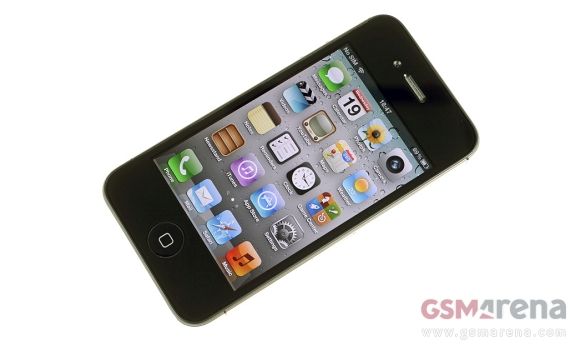
The hotly anticipated iPhone 6 looks bound to be a bigger success than expected. Research data from Morgan Stanley which shows a huge number of active iPhone 4 and 4s devices points at a massive upgrade cycle in the making.

The data which Morgan Stanley gathered is from the four major US carriers – AT&T, Verizon, Sprint, and T-Mobile. It shows that almost half of the iPhone users out there are going to be due for an upgrade when the latest smartphone from Cupertino hits the shelves.

While there is no guarantee that all users of older iPhone hardware will switch to iPhone 6, we reckon that the yet to be announced handset surely has a good chance of being their choice. Apple iPhone 6 has already made a couple of alleged appearances and is expected to launch this fall with 4.7” display on board.
Source | Via

Xiaomi Redmi Note hits 15 million pre-orders

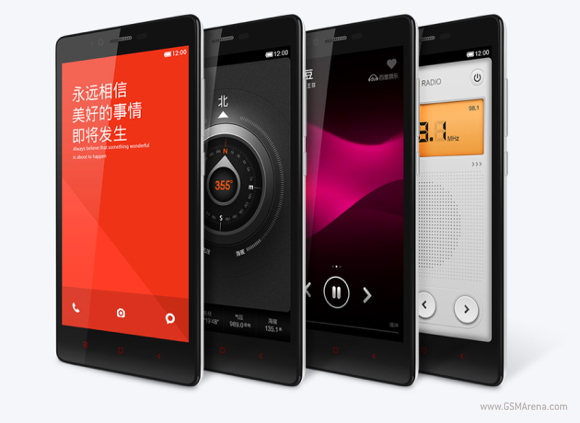
Thanks to its clever marketing strategy called "Hunger Marketing," Xiaomi managed to sell 100,000 Redmi Notes in 34 minutes back in March. Now, the company proudly boasts 15 million people have pre-ordered the $161 phablet.


That number beats Apple's cumulative iPhone 5s and iPhone 5c opening weekend's 9 million sales as well as the Samsung Galaxy S5's. Mind you, Xiaomi's definition of pre-order doesn't necessarily mean that the users have paid their Redmi Note smartphones. The company counts regular pre-orders as such in addition to people signed up to receive more information about the phone via email.
The Redmi costs $161 (CNY999) and boasts a 5.5” 720 x 1280 display, a 1.7GHz octa-core chipset, 2GB RAM, 16GB internal storage, a 13MP camera, 3200mAh battery, and Android 4.2.2. That's certainly a lot of smartphone for a very modest price tag.
Nevertheless, 15 million people registering only reaffirms the smartphone market strength in China and Xiaomi's clever way of doing business. The company is expanding its market presence and by the year's end will start selling it flagship Xiaomi Mi3 in India, Brazil, and Russia as well as Indonesia, Malaysia, Mexico, the Philippines, Thailand, Turkey, and Vietnam.
ViaVia (2)

Android in April: KitKat gains rapidly

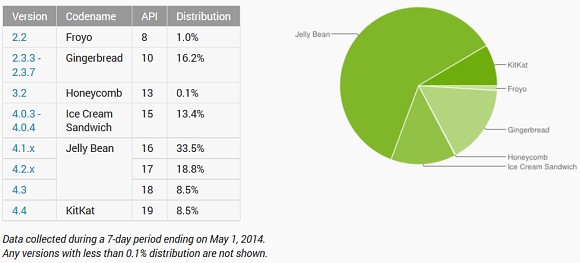
Yet another month passed and Google is quick to release the statistics on the distribution of the different Android versions. April’s most rapid development saw KitKat gain some 3.2 points, bringing its overall market share to 8.5%.
The three Jelly Bean distributions had mixed fate – 4.1 dropped 0.9 points but still remained the most widely adopted version with its 33.5% share. 4.2 actually expanded its share by 0.7 points to 18.8%, while 4.3 dropped 0.4 points and is now tied with KitKat at 8.5%.


As you could expect all releases prior to Jelly Bean kept losing ground – Android 4.0 Ice Cream Sandwich went down by 0.7 percent points, Gingerbread lost 1.6 points and Froyo dropped another 0.1 points. Honeycomb is still stuck at 0.1% share – it will remain there until Google pronounces it officially extinct.
Source

Pebble Steel smartwatch review

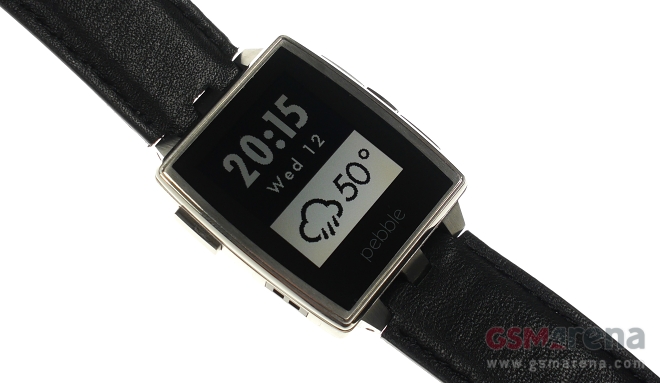
Announced at this year’s CES in January, the Pebble Steel was one of the brightest stars of the show. The newcomer is the young company’s upscale sidekick to the original Pebble, which took Kickstarter by storm last year.

In addition to its sleek looks and premium build, the Pebble Steel arrives with a well-polished, dedicated store for apps and watchfaces.
Retail package
The Pebble Steel ships in a retail package, which matches its premium aspirations. The nicely-looking black box with a leather-like finish contains the smartwatch, a metal band to match the gadget’s finish, a black genuine leather band, a USB charger, and a couple of booklets.

The retail package is decidedly luxurious
There is nothing missing in the retail box of the Pebble Steel as far as additional accessories go.
Hardware
The Pebble Steel features the same hardware and controls as its regular sibling. The only major addition to the newcomer is a tri-color RGB notification light added discreetly in the clock face lower left corner.
The above considered, the Pebble Steel features 80 MHz ARM Cortex-M3 CPU, 1.26” LED backlit e-paper display with a resolution of 144 x 168 pixels, and Bluetooth 4.0. The rest of the specs include a 3D accelerometer, ambient light sensor, and e-compass capability.
As before, charging once again takes place over a proprietary cable which attaches to the Pebble Steel through a magnet. Battery life of the gadget is rated at solid 5-7 days. So far I haven’t had the opportunity to measure the real life performance of the battery.
Design and build quality
Design and build quality are the two areas where the Pebble Steel stands out head and shoulders not only above its regular sibling, but also above its competitors. The smartwatch offers hands-down the best looks and build quality on the market today.


The Pebble Steel looks great in the flesh
The design of the Pebble Steel follows a classic tonneau watch theme with a rather compact footprint, considering today’s watch size standards. The device is great to look at in the flesh and can easily be mistaken for a regular watch without a closer look.
Available in a stainless steel or matte black finish with a matching metal bracelet, the smartwatch is the only offering currently on the market, which you can wear with more formal attire without looking like a total geek. The Steel represents a massive improvement over its predecessor in this regard.
Build quality of the Pebble Steel is exceptional. With an all-metal body and display covered in Gorilla Glass, the smartwatch is ready to take on life without breaking a sweat (or a front panel glass).
Additionally, the Steel with a metal bracelet is waterproof at up to 5ATM (50m of depth) and you can actually go swim with it. When using the leather strap however it doesn’t enjoy any waterproofing.
Ergonomics
At 56 grams (99 grams with the metal band), the Pebble Steel is slightly heavier than the first Pebble (38 grams). Thanks to its extra heft and metal build, the newcomer feels like a regular watch on the wrist, despite its slightly smaller footprint than the original.
The buttons are also finished in metal and offers great tactile feedback. Both the leather strap and the bracelet are well-made and comfortable. Choosing a favorite is entirely a matter of personal taste – I found myself enjoying the soft, genuine leather strap better.

The steel bracelet and the leather strap
Speaking of the bracelet and the leather strap, it is worth pointing out that instead of making the Steel with standard 22mm lugs, Pebble opted of a proprietary setup. This means that users will not be able to freely change the gadget’s strap or bracelet with a third-party one of their choice.
Overall, the Pebble Steel deserves high marks for its ergonomics. The smartwatch is great to live with on a daily basis by combining ease of use and superb tactility.
Pebble app
The Pebble app is the one-stop shop for all apps, watchfaces, and settings of the Pebble Steel. It is available for Android and iOS and features clean design and intuitive interface.
When you install and open up the app for the first time, you will be prompted to pair the Pebble Steel with your smartphone. The process takes a couple of minutes and is as simple as following the on-screen instructions.
Once you complete the setup, each time you open the app you will be greeted by the My Pebble menu. It shows you the installed content on the smartwatch, including watchfaces and apps, and lets you adjust it or remove it. Up to eight apps or watchfaces can be installed on the watch.

The My Pebble menu
A Pebble Locker submenu displays all the content you have installed on the smartwatch, including the content you have removed from the device. Of course, you can remove apps and watchfaces from the Pebble Locker too.
The next section of the Pebble App is the watchfaces’ showcase. All available watchfaces are arranged into categories – you get featured on top, followed by a section for all watchfaces, most loved, and Pebble picks.

There are plenty of watchfaces to choose from
There is a large number of watchfaces available on the platform. They range from all-business solutions, through minimalistic ones, all the way through honestly goofy designs.

Some of the available watchfaces
The section with Pebble apps is neatly organized in six categories – daily, tools & utilities, notifications, remotes, health & fitness, and games. Popular apps are featured in a section above the categories.

The apps section
The list of available apps for the platform is extensive and includes popular and handy titles such as Yelp, Evernote, Pandora remote control, etc. It sets the Pebble Steel apart from its competitors and is bound to grow even further as the company makes a great deal of effort in expanding its catalog.

A look at the app catalog
Final words
Among the currently available smartwatches, the Pebble Steel is the easiest one to recommend. It combines classic looks, solid build quality, water resistance, and top notch battery life. Even more importantly, the smartwatch offers rich, constantly growing selection of apps thank to a vibrant developer community.
Pebble’s entire approach to what a smartwatch should do is impressive. Unlike most of its competing smartwatches, which try to take over as many smartphone duties as possible, the Pebble Steel is focused on superbly delivering notifications while acting like a regular watch the rest of the time.
The Pebble Steel pricing kicks off at $229 for a watch with only a leather strap. You can pick one up directly from Pebble over here.